















The letter V followed by exactly six digits.
Ford V-Series
Ford V-Series radio code
Enter a number beginning with V or add a photo of the label.
First, we check free of charge whether we can recover the code for this radio.
Radio code recovery price3.49 EURFinal price and available currency are shown securely at checkout.
Enter the radio number or details
Add a label or radio photo
FORD V-SERIES
Find the correct number first
A Ford radio may request its security code after the battery has been disconnected or discharged. For V-Series we recover the code from a serial number in the V + 6 digits format. If you are unsure which number on the label is correct, paste the whole label text or add a photo.
This is an example part number. It can help identify the unit, but it does not replace the V-Series serial number.
IDENTIFICATION
Where can I find the V-Series number?
Check the radio display
Switch the radio on and hold buttons 1 and 6 together. The display should cycle through device information — look for a number beginning with V. If 1 + 6 does not show the serial number, try holding 2 and 6.
Check the unit label
If the number is not available on the display, read the label on the back or side of the radio. Look for a number beginning with V. If the label contains several identifiers, add a photo or paste all of its text — do not guess.
Not sure which number is correct?
Take a clear photo of the whole label with sharp, uncropped text. Add it above — OCR will read the text and identification will try to select the correct serial number.
DECODER SELECTION
Is this definitely Ford V-Series?
Check the beginning of the serial number first. If it is V + 6 digits, this is the correct decoder. The 6000 CD name alone is not enough: similarly named radios can use other serial families and require another method.
CHECK THIS
Common mistakes
- ×Entering a part number such as 6M2T-18C815-AF instead of the Vxxxxxx serial number.
- ×Removing the letter V. Enter the complete number, for example V024301 — not only the six digits.
- ×Choosing a random number from a label containing several identifiers.
- ×Assuming V means the manufacturer Visteon. This method is selected by the Vxxxxxx serial format, not the logo on the label.
READOUT EXAMPLE
After 1 + 6 the radio may show several screens
Do not stop at the first message. The radio may cycle through several technical items. You need the number in V + 6 digits format. If you see a longer string, several screens or are unsure, paste the complete reading exactly as displayed — do not remove characters or try to reshape it manually.
Look for a string in this formatV024301Look for the letter V followed by exactly six digits. You do not need to interpret the other screens yourself.
WHEN READING DOES NOT GO AS EXPECTED
Cannot see a V number? Do not guess
Use the information the radio actually displays first. Move to the label only when the screen does not provide the serial number.
1 + 6 does not show Vxxxxxx
Let the radio cycle through every screen. If no V number appears, try 2 + 6. If it is still absent, check the unit label.
The display shows several different items
Do not choose a random fragment. Look for V + 6 digits. You can also paste the complete reading exactly as shown without shortening it.
The label contains several numbers
Look for SERIAL NO. PART NO. identifies the part and does not replace the serial. If unsure, add a photo of the complete label.
The radio shows WAIT or LOCKED
Do not enter more random codes. WAIT is a temporary lock after incorrect attempts. LOCKED means the attempts have been exhausted and requires separate handling — another code alone will not solve it.
SEE A REAL RADIO
Radio and label — what exactly should you look for?
These examples show the difference between the radio appearance and the data actually needed. A 6000 CD front panel does not determine the method. The serial number read from the radio or label does.
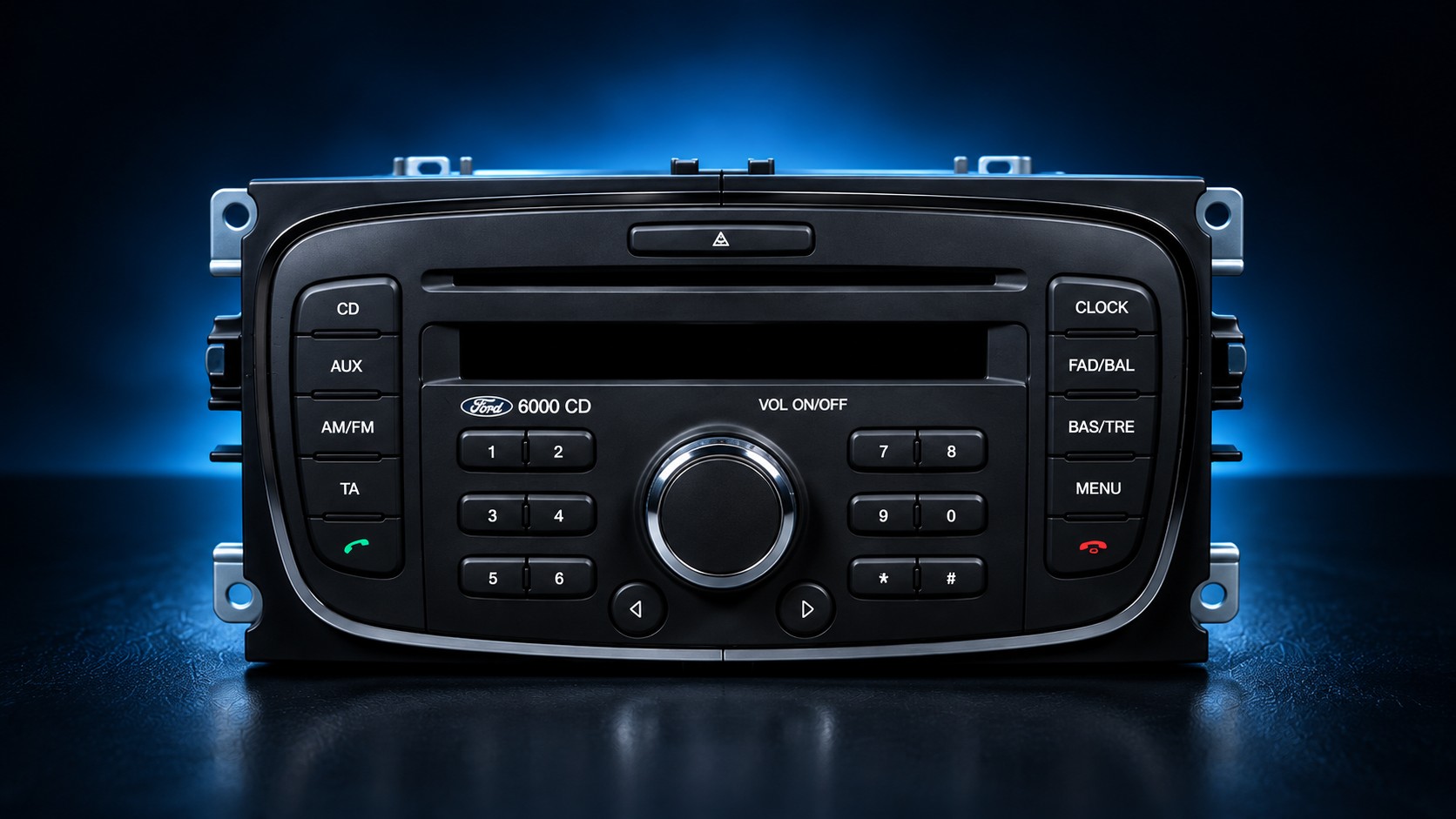
An example 6000 CD unit. The panel appearance alone is not enough to select the method — the serial number is required.
- SERIAL NO. V283128
- serial number — this is what you need
- PART NO. 8M5T-18C815-AB
- part number — do not enter it as the serial
- MODEL 6000 CD / Single CD KW2000
- radio model designation
- SERIAL NO. V019270
- serial number — this is what you need
- PART NO. 8S7T-18C815-AA
- part number — do not enter it as the serial
- MODEL SINGLE CD - GGDS D+
- radio model designation
- SERIAL NO. V022132
- serial number — this is what you need
- PART NO. 7M5T-18C815-BA
- part number — do not enter it as the serial
- MODEL SINGLE CD - KW2000
- radio model designation
6000 CD IS NOT ONE MODEL
Same name on the front, different radios underneath
Parts catalogues contain many units described as Ford 6000 CD. They differ by part number, model designation and manufacturer. That is why the decoder is not selected from the 6000 CD name alone.
WHEN THE NUMBER IS NOT ON THE DISPLAY
How do I reach the radio label?
Removal depends on the panel and vehicle, so there is no single universal procedure. Units with four holes in the panel corners use DIN removal keys: insert them, release the catches and slide the radio forward. Usually you do not need to disconnect the wiring just to read the label.
ANOTHER FORD NUMBER?
It may be another radio family
Do not alter the number to make it fit V-Series. Use the existing service that matches what is actually on the radio.
M + 6 digitsFord M-Series →
Number beginning with BPBlaupunkt / TravelPilot 300 →
TravelPilot FXA05/A06 and F05/F06 series →
TravelPilot NXF07/F09 series →
Not sure what you have?Paste all label data or add its photo in the form above. Identification does not require you to guess the radio family.
AFTER RECOVERING THE CODE
How do I enter the radio code?
Code entry depends on the radio type. Classic 6000CD/6006CDC units with buttons 1–6 work differently from Sony units with a numeric keypad.
6000CD / 6006CDC
Buttons 1–4 set the digits · 5 confirms
- Press button 1 until the first position shows 5.
- Press button 2 until the second position shows 0.
- Use button 3 to set 7 and button 4 to set 2.
- Check that the display shows 5072, then press button 5 to confirm.
Sony CD / Sony DAB
Enter the digits directly
- Press 5, 0, 7, 2 in sequence — each code digit is selected directly.
- If you make a mistake, continue entering digits. After the fourth position the cursor returns to the first so you can correct the code.
- When 5072 is shown correctly, confirm with * or the button between the navigation controls, depending on the radio version.
FAQ
Ford V-Series code questions
Will the code work after the battery was disconnected?
If the radio is requesting its security code, we need the correct serial number to recover it. For this service that is V + 6 digits.
Do I have to remove the radio from the car?
Not always. First try the display using 1 + 6 and, if necessary, 2 + 6. Use the label only if the serial cannot be read from the display.
I have a 6000 CD. Do I definitely need the V-Series decoder?
No. The 6000 CD name appears on different units. This service is selected by a V + 6 digit serial number, not the front-panel name.
My number begins with M or BP. What should I do?
Do not change it to V. It is another radio family. Use the Ford M-Series or Blaupunkt/TravelPilot service linked above.